 EN
EN



DMX Splitter vs DMX Controller: What Does Your Lighting System Need?
A dmx usb interface is often the starting point for PC-based lighting control, but it is not the same thing as a DMX controller or a DMX splitter. Those three components solve different problems: one gets control data out of software, one creates and manages the show, and one distributes a signal safely across the venue. Understanding the distinction makes a lighting system easier to specify, expand, and troubleshoot.
For a bar, club, wedding production, touring package, or rental inventory, the appropriate choice depends on how you create cues, how many separate cable branches you need, and how important isolation is on a busy site. More accurately, the question is rarely “splitter or controller?” A robust system often uses both.
Start with the DMX signal path
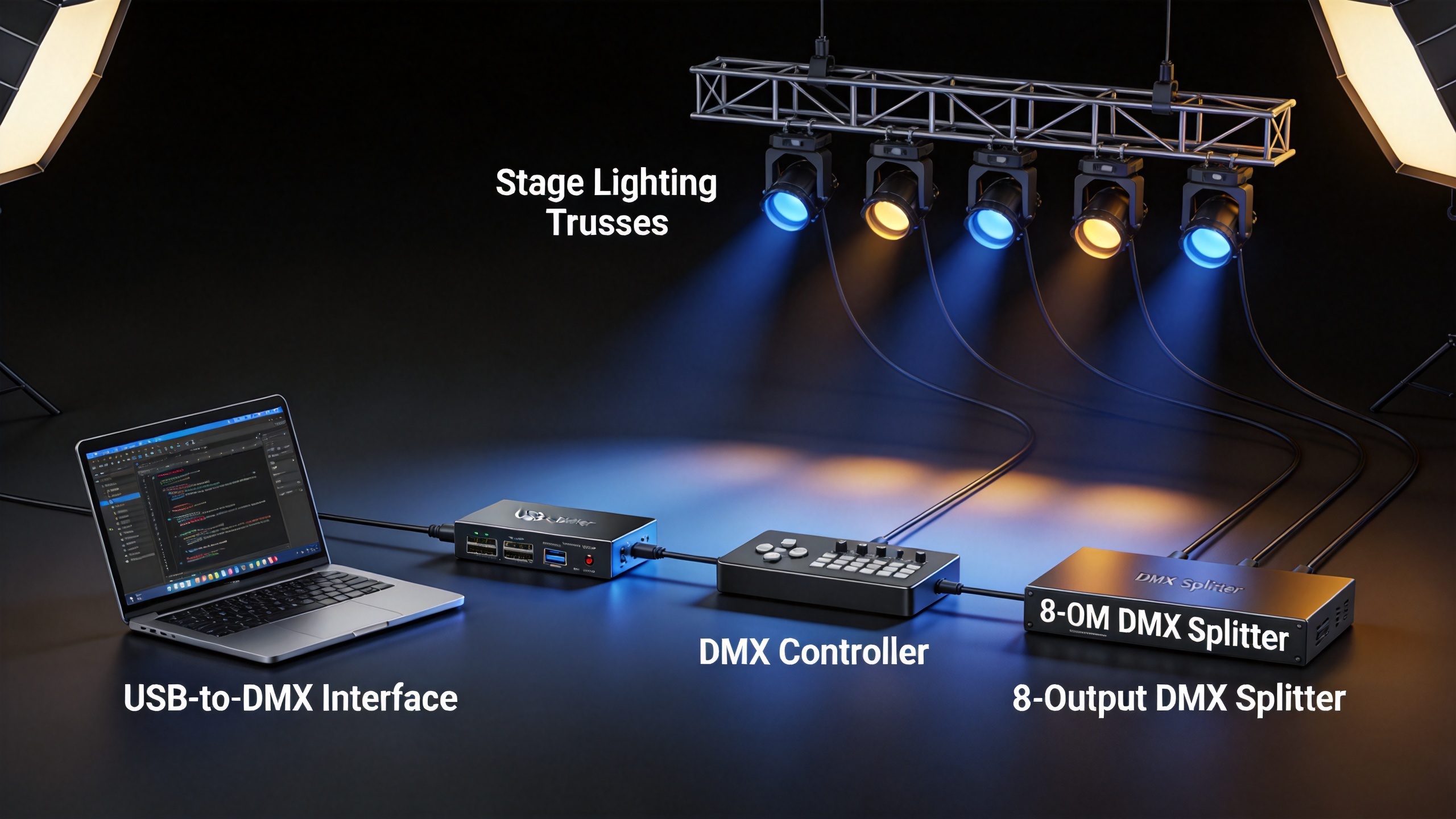
A typical system follows a simple path: lighting software or a console creates control values; a controller or dmx usb interface sends those values into a DMX line; fixtures receive the data; and a splitter creates protected branches when the line must travel in several directions. DMX512 uses a universe of up to 512 channels, with each channel carrying a value from 0 to 255. That capacity belongs to the universe itself, so a splitter does not add channels or create an additional universe.
Think of the controller as the decision-maker and the splitter as the traffic organizer. The controller decides when a moving head tilts, a wash light changes color, or a dimmer fades. The splitter takes that outgoing DMX signal and sends it to multiple physical runs.
What a DMX controller actually does
A DMX controller generates the lighting instructions. It may be a hardware console, a standalone controller, or software running on a computer. When software is used, a dmx usb interface converts the computer’s USB output into a DMX signal for the fixtures. In that setup, the software handles programming and playback, while the interface is the bridge to the DMX network.
Choose a controller or software-plus-dmx usb interface first when you need to:
- Build scenes, chases, cue stacks, or time-based playback.
- Assign fixture addresses and channels to a show file.
- Run live looks for a DJ set, stage performance, architectural installation, or event.
- Coordinate several fixture types from one programming environment.
- Use compatible RDM functions where supported, such as discovering devices or reading configuration information.
Without a control source, a splitter has no show data to distribute. If you are assembling a new system, confirm the control workflow before selecting distribution hardware: will an operator use a console, a computer with a dmx usb interface, or a standalone playback unit?
What a DMX splitter does—and does not do
A DMX splitter receives one DMX input and creates multiple outputs. Its main job is to distribute a signal into separate cable branches. This is valuable when fixtures are installed in different truss sections, rooms, zones, or stage directions. Instead of forcing every fixture into one long daisy chain, you can create shorter, easier-to-manage runs.
Many professional splitters also provide electrical isolation between outputs. That separation can help localize a cable or fixture fault rather than allowing one troublesome branch to affect the entire system. However, the exact isolation, boosting, termination, and protocol features vary by model, so verify the current product documentation before specifying a unit.
A splitter does not program cues, choose colors, add DMX universes, or replace a dmx usb interface where PC-based control is needed. It simply distributes the control signal it receives.
DMX controller vs DMX splitter: a practical comparison
| Question | DMX controller / dmx usb interface | DMX splitter |
|---|---|---|
| Primary role | Creates or delivers control data to the DMX network. | Distributes one incoming DMX signal to multiple physical branches. |
| Needed for programming? | Yes. A controller or software with a dmx usb interface is the control source. | No. It does not create cues or playback. |
| Adds channels or universes? | A compatible multi-universe control system may do so. | No. It replicates the same incoming universe across outputs. |
| Typical use | Show programming, playback, and fixture control. | Long runs, branching layouts, truss zones, and more organized distribution. |
| Typical buying priority | First, because the system needs a control source. | Next, when the physical network needs multiple branches or better fault separation. |
When your system needs both
Most medium and large lighting systems benefit from both layers. For example, a computer running lighting software can connect through a dmx usb interface to a splitter at front of house. One splitter output can feed stage-left moving heads, another can feed stage-right fixtures, and another can feed a rear truss or a separate room. The control source remains central, while cable routing becomes cleaner.
For a branching installation, an 8-way DMX Splitter Booster with Artnet can be evaluated as a distribution option. Confirm its current input, output, network, and isolation specifications against your project’s controller, fixture count, cabling plan, and applicable site requirements before purchase.
This approach also helps rental teams. Label each splitter output by zone, document the line path, and test every branch before load-in. If a problem appears, you can check one branch at a time rather than tracing a single uninterrupted chain across the entire venue.
Choose by system scenario, not by product name
Small one-room setup
If a small set of fixtures can follow a short, clean daisy chain, start with a controller or software and a dmx usb interface. A splitter may not be necessary yet. Use proper DMX cable, set unique fixture addresses, and terminate the last device according to the equipment instructions.
Multi-zone venue or touring stage
When fixtures branch toward several trusses, rooms, or stage zones, add a splitter after the controller or dmx usb interface. It gives each route a defined starting point and makes the cable plan easier to document.
Growing rental inventory
Prioritize a flexible control platform, then use splitters where separate outputs simplify prep, deployment, and fault isolation. Ask whether the team needs one universe or several; a splitter copies a signal, while additional universes require compatible control and distribution equipment.
A five-question buying checklist
- Where do cues come from? Choose a console, standalone controller, or software with a compatible dmx usb interface.
- How many universes are required? Count fixture channels and leave room for future expansion. Do not treat splitter outputs as extra universes.
- How many physical branches are needed? Map trusses, rooms, and cable routes. Multiple branches point toward a splitter.
- What fault tolerance is appropriate? For professional events and complex installations, confirm each splitter’s actual isolation and signal-management features.
- How will the line be commissioned? Use DMX-rated cable, unique addressing, sensible routing, and termination at the end of each applicable run. A 120-ohm terminator is commonly used at the final end of a DMX daisy chain; follow the documentation for the installed equipment.
The bottom line
A dmx usb interface connects PC-based control to a DMX network. A DMX controller creates or plays back the lighting decisions. A DMX splitter distributes that signal across physical branches. If your question is “How do I control the lights?”, start with the controller and, when applicable, the dmx usb interface. If your question is “How do I send one reliable control signal to several parts of the venue?”, add a splitter.
Before finalizing a system, sketch the signal path from control source to every fixture zone. That one exercise reveals whether you need only a control gateway, a controller plus a splitter, or a multi-universe design that should be reviewed in detail with the equipment documentation and your project team.